




Whether you’re a researcher wanting to use genomics data for the first time, or a seasoned user in need of updating your data access login password, OCG’s new Guide to Accessing TARGET Data is designed to make your life easier. It is a handy, easy-to-use resource that has a Q&A style format with graphics and embedded videos. The guide is accessible from the Using TARGET Data webpage or you can bookmark it in your web browser for quick reference. Go ahead; take a peek at the Guide. After you look through it, we would appreciate suggestions and feedback via email: ocg@mail.nih.gov.
The Guide to Accessing TARGET Data is intended to help all users – new, approved, or experienced – navigate through the Data Use Certification process, maintain user accounts, and download TARGET data. Starting at the top of the guide, there are clickable shortcuts that let you jump to the section most relevant to your needs:
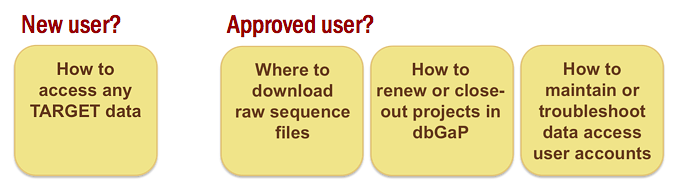
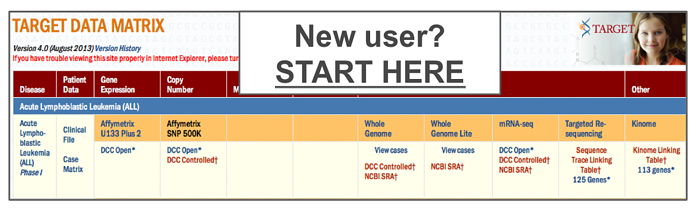
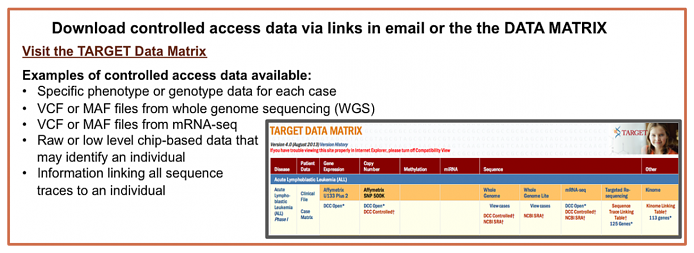
Investigators that have never used OCG-generated data can click on the “How to access any TARGET data” box to start at the beginning of the guide. Here, you will learn about the two types of data available from TARGET: open and controlled access. Open access data are readily downloadable by anyone. Controlled access data can only be downloaded by researchers that obtained approval in the form of Data Use Certification. The links to open and controlled access data are color-coded in the Data Matrix for quick identification (see below).
The next section “How do I access open and/or controlled TARGET data?” contains a visual and interactive flowchart that walks you through the entire data access process. Regardless of what type of data you seek, the flowchart will help you find and download it.
The flowchart starts at the TARGET Data Matrix, because most data are easily accessible through its links:
The blue links indicate open access data:
The orange links designate controlled access data, accessible to only approved users with the correct login credentials. To access these data requires navigating through the Data Use Certification process to gain approval; this is where the flowchart comes into play.
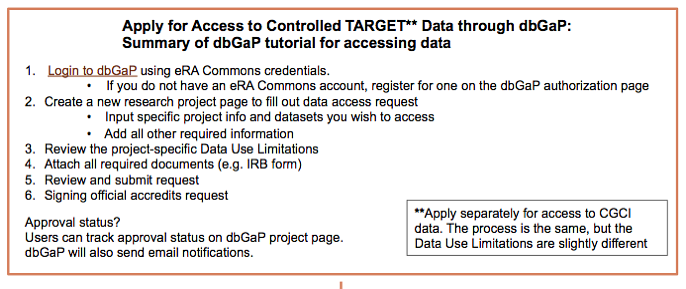
The flowchart provides an instructional video from the database of Genotypes and Phenotypes (dbGaP). Through recorded screen sharing and audio, this tutorial shows users in a step-by-step fashion how to apply for access to controlled data. For users looking to cut to the chase, a summary of the video’s most important points are also highlighted:
The remaining pieces of the flowchart summarize how to go from receiving approval notifications to downloading the data:
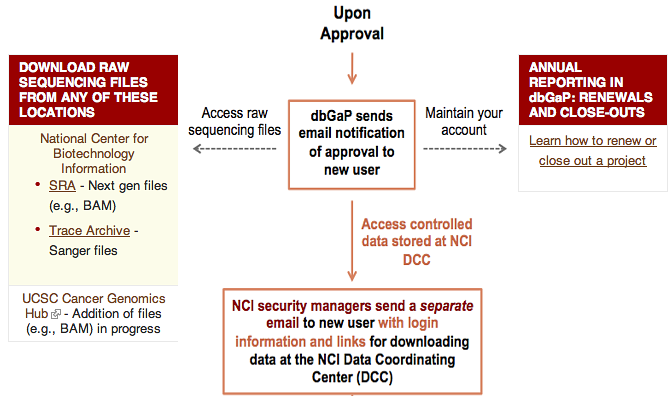
When you are first approved, you will be notified by an email from dbGaP. If you do not receive an email within about 4 weeks, contact dbGaP. Your dbGaP account initiates your ability to access data, but it also has to be maintained through annual reporting. The flowchart provides a link to information further down on the page that tells you how to maintain your dbGaP account. It is important to follow these instructions; otherwise you may lose access to the data one year after you gain approval.
One type of controlled access data, primary sequencing files, are housed at repositories external to the National Cancer Institute (i.e. National Center for Biotechnology Information and University of California, Santa Cruz). You cannot access these login pages directly from the TARGET Data Matrix. The flowchart conveniently links to each location where you can login and download sequencing files.
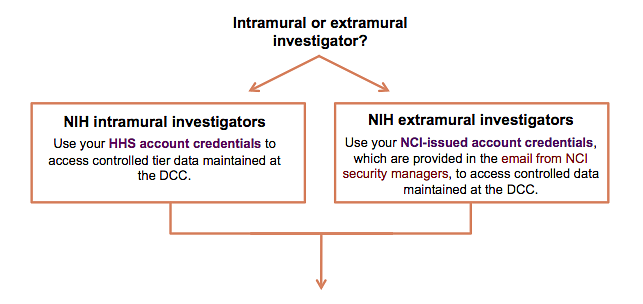
All other controlled access TARGET data are housed at NCI’s Data Coordinating Center (DCC). You can access these data from the TARGET Data Matrix. Shortly after receiving your dbGaP approval notification, you will receive a second email from the NCI’s security managers. This email will contain your specific login credentials and links to access controlled data stored at NCI’s DCC. Your login credentials will depend on whether you are an external investigator or an internal NIH investigator, and the flowchart covers this important distinction:
After OCG’s new flowchart has guided you through the Data Use Certification process for controlled access data, head to the TARGET Data Matrix to download the different types of data.
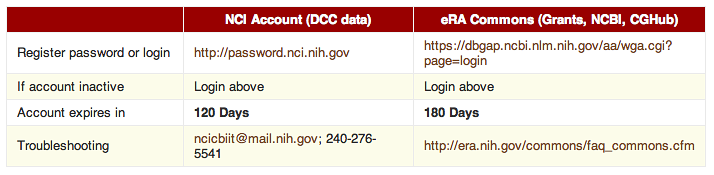
Finally, don’t forget about the new guide once you have access. The flowchart also has information about how to maintain user accounts…
…and video tutorials that teach you how to renew and close out data access projects in dbGaP.